Sunday, 2 January 2022
Tuesday, 26 October 2021
Get Ledger Dimension By Merging Main Account and Default Dimensions in D365 X++
Hello Guys,
Here is the post to convert the Default dimension to the ledger dimension.
protected DimensionDynamicAccount getLedgerDimension(mainAccountNum _mainAccountId, RefRecId _defaultDimension)
{
mainAccountNum mainAccountId = _mainAccountId;
MainAccount mainAccount;
DimensionAttribute dimensionAttribute;
DimensionAttributeValue dimensionAttributeValue;
DimensionSetSegmentName dimensionSet;
DimensionStorage dimensionStorage;
LedgerAccountContract ledgerAccountContract = new LedgerAccountContract();
DimensionAttributeValueContract valueContract;
DimensionAttributeValueSetStorage dimStorage;
List valueContracts = new List(Types::Class);
Counter i;
int hierarchyCount;
int hierarchyIdx;
RefRecId recordvalue;
mainAccount = MainAccount::findByMainAccountId(mainAccountId);
recordvalue = DimensionHierarchy::getAccountStructure(mainAccount.RecId,Ledger::current());
hierarchyCount = DimensionHierarchy::getLevelCount(recordvalue);
DimensionSet = DimensionHierarchyLevel::getDimensionHierarchyLevelNames(recordvalue);
for(hierarchyIdx = 1;hierarchyIdx<=hierarchyCount;hierarchyIdx++)
{
if(hierarchyIdx == 1)
{
continue;
}
// _defaultDimension is a RecId that combines all Dimension Values
dimStorage = DimensionAttributeValueSetStorage::find(_defaultDimension);
for (i= 1 ; i<= dimStorage.elements() ; i++)
{
if(DimensionAttribute::find(dimStorage.getAttributeByIndex(i)).Name == DimensionSet[hierarchyIdx])
{
dimensionAttribute = DimensionAttribute::findByLocalizedName(DimensionSet[hierarchyIdx],false, CompanyInfo::find().LanguageId);
if(dimensionAttribute)
{
dimensionAttributeValue = DimensionAttributeValue::findByDimensionAttributeAndValue(dimensionAttribute,dimStorage.getDisplayValueByIndex(i));
if(dimensionAttributeValue)
{
ValueContract = new DimensionAttributeValueContract();
ValueContract.parmName(dimensionAttribute.Name) ;
ValueContract.parmValue(dimensionAttributeValue.CachedDisplayValue);
valueContracts.addEnd(ValueContract);
}
}
continue;
}
}
}
LedgerAccountContract.parmMainAccount(mainAccountId);
LedgerAccountContract.parmValues(valueContracts);
dimensionStorage = DimensionServiceProvider::buildDimensionStorageForLedgerAccount(LedgerAccountContract);
return DimensionAttributeValueCombination::find(dimensionStorage.save()).RecId;
}
Tuesday, 9 July 2019
Tuesday, 30 April 2019
Delete File/ Folder from Azure storage account in D365 using X++ code
public void deleteFilesFromAzure(CloudBlobContainer _blobContainer)
{
CloudBlobDirectory blobDirectoryToDelete;
System.Collections.IEnumerable listToDelete;
System.Collections.IEnumerator listEnumeratorToDelete;
CloudBlockBlob blobToDelete;
blobDirectoryToDelete = _blobContainer.GetDirectoryReference("File/ folder name");
listToDelete = new System.Collections.Generic.List<str>();
listToDelete = blobDirectoryToDelete.ListBlobs(false, 0, null, null);
listEnumeratorToDelete = listToDelete.getEnumerator();
while (listEnumeratorToDelete.moveNext())
{
blobToDelete = listEnumeratorToDelete.get_Current();
blobToDelete.DeleteIfExists(DeleteSnapshotsOption::None, null, null, null);
}
}
Thanks,
DAXBuddy
Convert Base64(PDF file) to Memory stream in D365
Here you go...
System.IO.MemoryStream memoryStream = Binary::constructFromContainer(BinData::loadFromBase64("Base64 Value")).getMemoryStream() as System.IO.MemoryStream;
Thanks,
DAXBuddy
Get all files (Blobs) in a list from Azure storage container in D365 using X++ code
using Microsoft.WindowsAzure.Storage;
using Microsoft.WindowsAzure.Storage.Blob;
class Azure
{
public void processAzureBlobFiles()
{
var storageCredentials = new Microsoft.WindowsAzure.Storage.Auth.StorageCredentials("Storage account name", "Access key");
CloudStorageAccount storageAccount = new Microsoft.WindowsAzure.Storage.CloudStorageAccount(storageCredentials, true);
CloudBlobClient blobClient = storageAccount.CreateCloudBlobClient();
CloudBlobContainer blobContainer = blobClient.GetContainerReference("Container Name");
System.Collections.IEnumerable list = new System.Collections.Generic.List<str>();
list = blobContainer.ListBlobs(null, false, 0, null, null);
System.Collections.IEnumerator listEnumerator = list.getEnumerator();
while (listEnumerator.moveNext())
{
CloudBlockBlob blob = listEnumerator.get_Current();
if (blob.Exists(null, null))
{
str file = blob.StorageUri.PrimaryUri.AbsoluteUri;
str fileName = blob.Name;
}
}
}
}
"Storage account name" Can be taken from Azure -> Storage accounts -> Settings -> Access keys -> Storage account name
"Access key" Can be taken from Azure -> Storage accounts -> Settings -> Access keys -> Key1 or Key2
"Container Name" Can be taken from Azure -> Storage accounts -> Blobs -> Container name
Thanks,
DAXBuddy
Convert HTML text to PDF stream in D365
- Create a new console application VS project
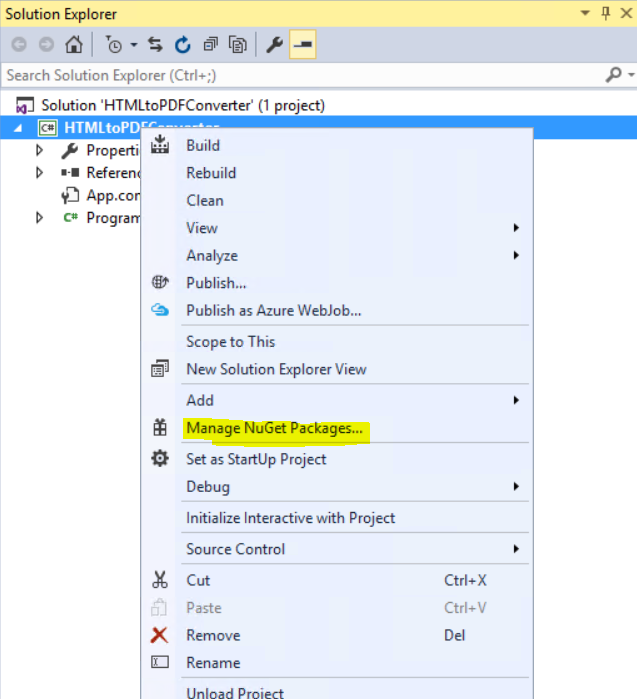
- Right click on the project and select "Manage NuGet package"
- New NuGet window opens, Search for "HTMLRenderer.PDFSharp" and install it.
- After installing you can see the installed references in the project
- To convert HTML to PDF we required only 3 references
- HTMLRenderer
- HTMLRenderer.PDFSharp
- PDFSharp
- Copy the .dll's file from the reference path for all the 3 references which is available in the properties
- Create a new D365 project and add the 3 references .dll's to the D365 project reference as image shown below unser D365 project